728x90
Ansible ansible-doc 명령어를 사용하는 방법
ansible-doc 이란?
ansible-doc은 Ansible에 포함된 모듈과 플러그인에 대한 공식 문서 조회 도구입니다.
인터넷 접속 없이도 로컬 환경에서 다음 정보를 바로 확인할 수 있습니다.
- 모듈/플러그인 설명
- 사용 가능한 옵션
- 지원되는 파라미터
- 예제(Task 스니펫)
ansible-doc 도움말 확인
ansible-doc -h$ ansible-doc -h
usage: ansible-doc [-h] [--version] [-v] [-M MODULE_PATH] [--playbook-dir BASEDIR]
[-t {become,cache,callback,cliconf,connection,httpapi,inventory,lookup,netconf,shell,vars,module,strategy,role,keyword}] [-j]
[-r ROLES_PATH] [-e ENTRY_POINT | -s | -F | -l | --metadata-dump]
[plugin [plugin ...]]
plugin documentation tool
positional arguments:
plugin Plugin
optional arguments:
--metadata-dump **For internal testing only** Dump json metadata for all plugins.
--playbook-dir BASEDIR
Since this tool does not use playbooks, use this as a substitute playbook directory.This sets the relative path for many features
including roles/ group_vars/ etc.
--version show program's version number, config file location, configured module search path, module location, executable location and exit
-F, --list_files Show plugin names and their source files without summaries (implies --list). A supplied argument will be used for filtering, can
be a namespace or full collection name.
-M MODULE_PATH, --module-path MODULE_PATH
prepend colon-separated path(s) to module library (default=~/.ansible/plugins/modules:/usr/share/ansible/plugins/modules)
-e ENTRY_POINT, --entry-point ENTRY_POINT
Select the entry point for role(s).
-h, --help show this help message and exit
-j, --json Change output into json format.
-l, --list List available plugins. A supplied argument will be used for filtering, can be a namespace or full collection name.
-r ROLES_PATH, --roles-path ROLES_PATH
The path to the directory containing your roles.
-s, --snippet Show playbook snippet for these plugin types: inventory, lookup, module
-t {become,cache,callback,cliconf,connection,httpapi,inventory,lookup,netconf,shell,vars,module,strategy,role,keyword}, --type {become,cache,callback,cliconf,connection,httpapi,inventory,lookup,netconf,shell,vars,module,strategy,role,keyword}
Choose which plugin type (defaults to "module"). Available plugin types are : ('become', 'cache', 'callback', 'cliconf',
'connection', 'httpapi', 'inventory', 'lookup', 'netconf', 'shell', 'vars', 'module', 'strategy', 'role', 'keyword')
-v, --verbose verbose mode (-vvv for more, -vvvv to enable connection debugging)
See man pages for Ansible CLI options or website for tutorials https://docs.ansible.com주요 옵션 정리
기본 옵션
- -h : 도움말 출력
- --version : Ansible 버전 및 설정 파일 위치 출력
- -v : 상세 출력 (-vvv, -vvvv 가능)
- -j : JSON 형식으로 출력
플러그인/모듈 조회 관련
- -l, --list : 사용 가능한 모듈/플러그인 목록 출력
- -F, --list_files : 모듈 이름 + 소스 파일 경로 출력
- -s, --snippet : Playbook에서 사용할 수 있는 예제 스니펫 출력
- -t, --type : 플러그인 타입 지정 (기본값: module)
플러그인 타입(-t) 종류
become, cache, callback, cliconf, connection,
httpapi, inventory, lookup, netconf,
shell, vars, module, strategy, role, keyword- module : 기본 모듈 (apt, ping, copy 등)
- inventory : 인벤토리 플러그인
- lookup : lookup 플러그인
- callback : 실행 결과 출력 방식
모듈 목록 확인
전체 모듈/플러그인 목록 출력
ansible-doc -l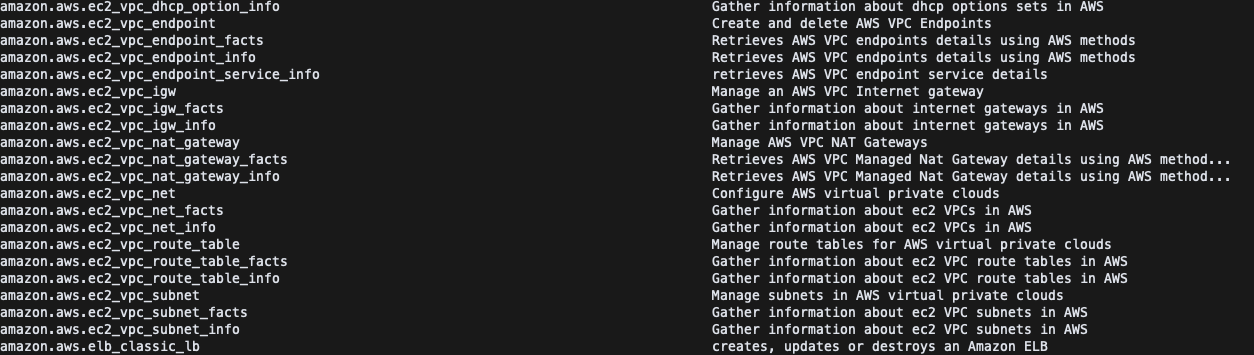
특정 컬렉션만 필터링
ansible-doc -l | grep apt특정 모듈 문서 확인 (예: ping 모듈)
모듈 설명 및 옵션 확인
ansible-doc pingPlaybook 스니펫 확인
ansible-doc -s ping- name: Ping test
ansible.builtin.ping:플러그인 타입 지정 예제
inventory 플러그인 문서 확인
ansible-doc -t inventory aws_ec2lookup 플러그인 목록 확인
ansible-doc -t lookup -lJSON 형식으로 출력 (자동화/분석용)
ansible-doc -j ping
728x90
'리눅스' 카테고리의 다른 글
| [WIP] Ansible ansible-vault 명령어를 사용하는 방법 (0) | 2026.03.01 |
|---|---|
| [WIP] Ansible ansible-config 명령어를 사용하는 방법 (0) | 2026.03.01 |
| [WIP] Ansible apt 모듈을 사용하는 방법 (0) | 2026.03.01 |
| [WIP] 현재 통신 가능한 현재 통신 가능한 인터페이스의 이름들이 출력이름을 출력하는 명령어 (0) | 2026.02.28 |
| [WIP] 소스 컴파일 중 "reason: No space left on device" 오류 (0) | 2026.02.28 |


