728x90
Spring Boot 프로젝트 생성 및 Gradle로 빌드하기
Spring Boot 프로젝트를 생성한 후 Gradle을 이용하여 빌드(Build)하고 실행하는 방법입니다.
1. Gradle 설정
Spring Boot 프로젝트에서 사용하는 주요 설정은 build.gradle 파일에 정의됩니다.
build.gradle 설정
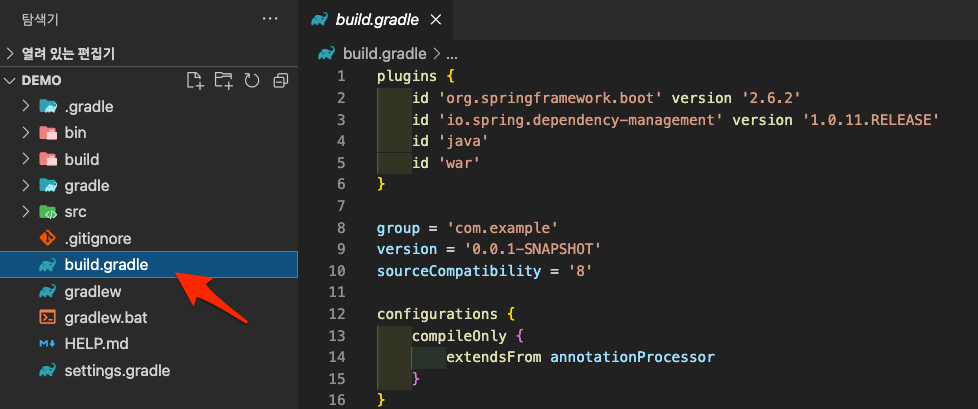
plugins {
	id 'org.springframework.boot' version '2.6.2'
	id 'io.spring.dependency-management' version '1.0.11.RELEASE'
	id 'java'
	id 'war'
}

group = 'com.example'
version = '0.0.1-SNAPSHOT'
sourceCompatibility = '8'

configurations {
	compileOnly {
		extendsFrom annotationProcessor
	}
}

repositories {
	mavenCentral()
}

dependencies {
	implementation 'org.springframework.boot:spring-boot-starter-web'
	compileOnly 'org.projectlombok:lombok'
	developmentOnly 'org.springframework.boot:spring-boot-devtools'
	annotationProcessor 'org.projectlombok:lombok'
	providedRuntime 'org.springframework.boot:spring-boot-starter-tomcat'
	testImplementation 'org.springframework.boot:spring-boot-starter-test'
}

test {
	useJUnitPlatform()
}
2. 프로젝트 구조 확인
프로젝트 디렉토리 구조 예시입니다.
$ ls -l
total 48
-rw-r--r--  1 staff  staff  1150 12 25 01:55 HELP.md
drwxr-xr-x  4 staff  staff   128 12 25 01:55 bin
-rw-r--r--  1 staff  staff   736 12 25 01:55 build.gradle
drwxr-xr-x  3 staff  staff    96 12 25 01:55 gradle
-rwxr-xr-x  1 staff  staff  8070 12 25 01:55 gradlew
-rw-r--r--  1 staff  staff  2763 12 25 01:55 gradlew.bat
-rw-r--r--  1 staff  staff    26 12 25 01:55 settings.gradle
drwxr-xr-x  4 staff  staff   128 12 25 01:55 src
주요 파일
- build.gradle : Gradle 빌드 설정
- gradlew : Gradle Wrapper 실행 파일
- settings.gradle : 프로젝트 설정
- src : 소스 코드 디렉토리
3. Gradle Task 확인
Gradle에서 사용할 수 있는 Task 목록을 확인합니다.
./gradlew tasks> Task :tasks
------------------------------------------------------------
Tasks runnable from root project 'demo'
------------------------------------------------------------
Application tasks
-----------------
bootRun - Runs this project as a Spring Boot application.
Build tasks
-----------
assemble - Assembles the outputs of this project.
bootBuildImage - Builds an OCI image of the application using the output of the bootJar task
bootJar - Assembles an executable jar archive containing the main classes and their dependencies.
bootJarMainClassName - Resolves the name of the application's main class for the bootJar task.
bootRunMainClassName - Resolves the name of the application's main class for the bootRun task.
build - Assembles and tests this project.
buildDependents - Assembles and tests this project and all projects that depend on it.
buildNeeded - Assembles and tests this project and all projects it depends on.
classes - Assembles main classes.
clean - Deletes the build directory.
jar - Assembles a jar archive containing the main classes.
testClasses - Assembles test classes.
Build Setup tasks
-----------------
init - Initializes a new Gradle build.
wrapper - Generates Gradle wrapper files.
Documentation tasks
-------------------
javadoc - Generates Javadoc API documentation for the main source code.
Help tasks
----------
buildEnvironment - Displays all buildscript dependencies declared in root project 'demo'.
dependencies - Displays all dependencies declared in root project 'demo'.
dependencyInsight - Displays the insight into a specific dependency in root project 'demo'.
dependencyManagement - Displays the dependency management declared in root project 'demo'.
help - Displays a help message.
javaToolchains - Displays the detected java toolchains.
outgoingVariants - Displays the outgoing variants of root project 'demo'.
projects - Displays the sub-projects of root project 'demo'.
properties - Displays the properties of root project 'demo'.
tasks - Displays the tasks runnable from root project 'demo'.
Jib tasks
---------
jib - Builds a container image to a registry.
jibBuildTar - Builds a container image to a tarball.
jibDockerBuild - Builds a container image to a Docker daemon.
Verification tasks
------------------
check - Runs all checks.
test - Runs the test suite.
Rules
-----
Pattern: clean<TaskName>: Cleans the output files of a task.
Pattern: build<ConfigurationName>: Assembles the artifacts of a configuration.
To see all tasks and more detail, run gradlew tasks --all
To see more detail about a task, run gradlew help --task <task>
Deprecated Gradle features were used in this build, making it incompatible with Gradle 8.0.
You can use '--warning-mode all' to show the individual deprecation warnings and determine if they come from your own scripts or plugins.
See https://docs.gradle.org/7.3.2/userguide/command_line_interface.html#sec:command_line_warnings
BUILD SUCCESSFUL in 1s
1 actionable task: 1 executed대표적인 Task
- bootRun : Spring Boot 실행
- build : 프로젝트 빌드
- clean : 빌드 결과 삭제
- test : 테스트 실행
728x90
4. 프로젝트 빌드
Gradle Wrapper를 사용하여 프로젝트를 빌드합니다.
./gradlew buildBUILD SUCCESSFUL in 18s
7 actionable tasks: 7 executed5. 빌드 결과 확인
빌드가 완료되면 다음 경로에 결과 파일이 생성됩니다.
$ pwd
./demo/build/libs

$ ls -l
total 58008
-rw-r--r--  1 staff  staff  12137042 12 25 13:15 demo-0.0.1-SNAPSHOT-plain.war
-rw-r--r-- 1 staff staff 17559349 12 25 13:15 demo-0.0.1-SNAPSHOT.war- demo-0.0.1-SNAPSHOT.war 실행 가능한 Spring Boot 애플리케이션
- demo-0.0.1-SNAPSHOT-plain.war 의존성이 포함되지 않은 WAR
6. Spring Boot 애플리케이션 실행
빌드된 파일을 java -jar 명령어으로 실행합니다.
빌드된 파일 경로에서 실행
cd build/libs
java -jar demo-0.0.1-SNAPSHOT.war
또는 프로젝트 루트에서 실행
java -jar ./build/libs/demo-0.0.1-SNAPSHOT.war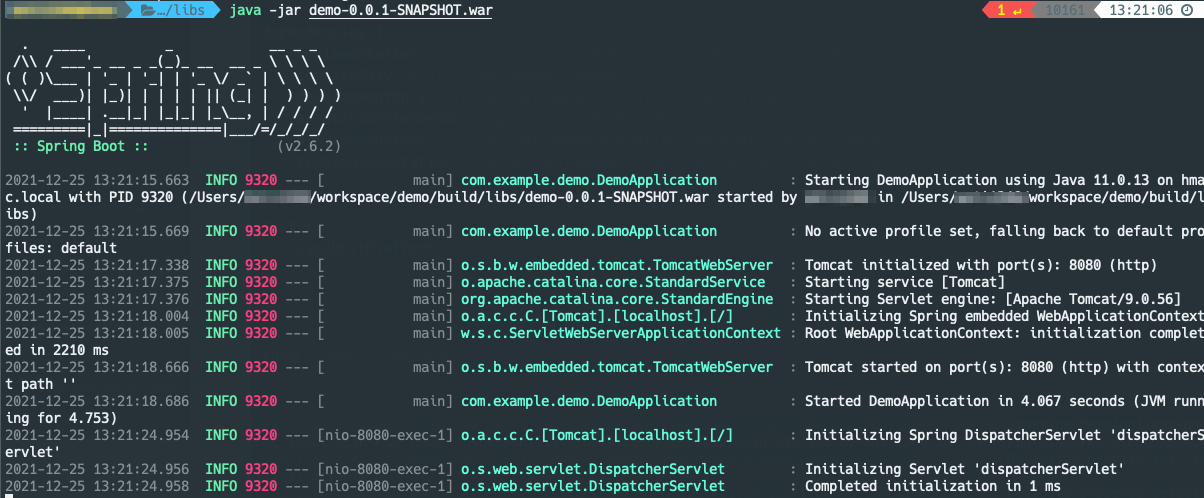
7. 실행 확인
웹 브라우저에서 다음 주소로 접속합니다.
http://localhost:8080Spring Boot 애플리케이션이 정상적으로 실행되면 웹 서비스가 동작합니다.
8. 프로젝트 재빌드
프로젝트를 다시 초기화하거나 재구성할 때 다음 명령을 사용할 수 있습니다.
./gradlew init이후 다시 빌드를 수행합니다.
./gradlew build
728x90
'리눅스' 카테고리의 다른 글
| [WIP] docker inspect 명령어 (0) | 2026.03.11 |
|---|---|
| [WIP] Docker 이미지를 파일로 저장하고 불러오는 방법 (0) | 2026.03.11 |
| [WIP] CentOS 7에서 Gradle을 설치하는 방법 (0) | 2026.03.11 |
| [WIP] Docker rmi 명령어 (0) | 2026.03.10 |
| [WIP] Docker ps filter 옵션을 사용하는 방법 (0) | 2026.03.09 |


