728x90
우분투에서 Elasticsearch와 Kibana를 설치 및 클러스터을 구성하고 상태를 확인하는 방법(elasticsearch 8.12.1)
1. 운영체제 사전 설정
Limits 설정
cat << EOF >> /etc/security/limits.conf

### elasticsearch
elasticsearch       hard    nofile   65535
elasticsearch       soft    nofile   65536
elasticsearch       hard    nproc    65536
elasticsearch       soft    nproc    65536
elasticsearch       hard    memlock  unlimited
elasticsearch       soft    memlock  unlimited
EOF
커널 파라미터 설정
echo "vm.max_map_count = 262144" | tee -a /etc/sysctl.conf
echo "vm.swappiness = 1" | tee -a /etc/sysctl.conf
sysctl -p
Swap 비활성화
sudo swapoff -a
sudo sed -i '/swap/ s/^/#/' /etc/fstab
기존 설치 제거(Elasticsearch, Kibana 삭제)
더보기
---
sudo apt-get purge -y --allow-change-held-packages elasticsearchsudo rm -rf /etc/elasticsearch /var/lib/elasticsearchsudo rm -rf /etc/default/elasticsearch /usr/share/doc/elasticsearch /var/log/elasticsearchsudo apt-get purge -y --allow-change-held-packages kibanasudo rm -rf /etc/kibana /var/lib/kibanasudo apt-get autoremove -y---
2. Elasticsearch 설치
저장소 등록
apt-get install -y apt-transport-https

wget -qO - https://artifacts.elastic.co/GPG-KEY-elasticsearch \
| gpg --dearmor -o /usr/share/keyrings/elasticsearch-keyring.gpg

echo "deb [signed-by=/usr/share/keyrings/elasticsearch-keyring.gpg] \
https://artifacts.elastic.co/packages/8.x/apt stable main" \
| tee /etc/apt/sources.list.d/elastic-8.x.list

apt-get update
패키지 설치
sudo apt-get install -y elasticsearch설치 시 자동 생성
- TLS 인증서
- elastic 계정 비밀번호
- Security 기본 활성화
--------------------------- Security autoconfiguration information ------------------------------

Authentication and authorization are enabled.
TLS for the transport and HTTP layers is enabled and configured.

The generated password for the elastic built-in superuser is : IT-FMSfCEhw+1_W+vHsz

If this node should join an existing cluster, you can reconfigure this with
'/usr/share/elasticsearch/bin/elasticsearch-reconfigure-node --enrollment-token <token-here>'
after creating an enrollment token on your existing cluster.

You can complete the following actions at any time:

Reset the password of the elastic built-in superuser with
'/usr/share/elasticsearch/bin/elasticsearch-reset-password -u elastic'.

Generate an enrollment token for Kibana instances with
 '/usr/share/elasticsearch/bin/elasticsearch-create-enrollment-token -s kibana'.

Generate an enrollment token for Elasticsearch nodes with
'/usr/share/elasticsearch/bin/elasticsearch-create-enrollment-token -s node'.

-------------------------------------------------------------------------------------------------
### NOT starting on installation, please execute the following statements to configure elasticsearch service to start automatically using systemd
 sudo systemctl daemon-reload
 sudo systemctl enable elasticsearch.service
### You can start elasticsearch service by executing
 sudo systemctl start elasticsearch.service
환경 변수 설정
- built-in superuser(elastic)의 비밀번호를 셸에 환경 변수로 저장
export ELASTIC_PASSWORD="IT-FMSfCEhw+1_W+vHsz"echo $ELASTIC_PASSWORDsystemd 설정(elasticsearch.service 파일 편집)
- 메모리 Lock
vim /usr/lib/systemd/system/elasticsearch.service[Service]
LimitMEMLOCK=infinity서비스 실행
systemctl daemon-reload
systemctl enable --now elasticsearch
3. Elasticsearch 설정
주요 설정 (/etc/elasticsearch/elasticsearch.yml)
vim /etc/elasticsearch/elasticsearch.yml#cluster.name: my-application
#node.name: node1
path.data: /var/lib/elasticsearch
path.logs: /var/log/elasticsearch
bootstrap.memory_lock: true
#network.host: 192.168.0.1
http.port: 9200
http.host: 0.0.0.0
#discovery.seed_hosts: ["node1", "node2", "node3"]
xpack.security.enabled: true
xpack.security.enrollment.enabled: true
xpack.security.http.ssl:
enabled: true
keystore.path: certs/http.p12
xpack.security.transport.ssl:
enabled: true
verification_mode: certificate
keystore.path: certs/transport.p12
truststore.path: certs/transport.p12
cluster.initial_master_nodes: ["node1"]
#cluster.initial_master_nodes: ["node1", "node2", "node3"]서비스 재시작/중지
sudo systemctl restart elasticsearch.servicesudo systemctl stop elasticsearch.serviceElasticsearch 상태 확인
sudo systemctl status elasticsearch4. Elasticsearch 상태 확인
Elasticsearch API를 통해 클러스터 상태를 확인
curl --cacert /etc/elasticsearch/certs/http_ca.crt \
  -u elastic:$ELASTIC_PASSWORD https://localhost:9200
{
"name" : "node1",
"cluster_name" : "elasticsearch",
"cluster_uuid" : "Qr4VeMmnSWaEa2chrR2KTA",
"version" : {
"number" : "8.12.1",
"build_flavor" : "default",
"build_type" : "deb",
"build_hash" : "6185ba65d27469afabc9bc951cded6c17c21e3f3",
"build_date" : "2024-02-01T13:07:13.727175297Z",
"build_snapshot" : false,
"lucene_version" : "9.9.2",
"minimum_wire_compatibility_version" : "7.17.0",
"minimum_index_compatibility_version" : "7.0.0"
},
"tagline" : "You Know, for Search"
}Cluster Health 확인
curl --cacert /etc/elasticsearch/certs/http_ca.crt \
  -u elastic:$ELASTIC_PASSWORD \
  https://localhost:9200/_cluster/health?pretty
{
"cluster_name" : "elasticsearch",
"status" : "green",
"timed_out" : false,
"number_of_nodes" : 1,
"number_of_data_nodes" : 1,
"active_primary_shards" : 1,
"active_shards" : 1,
"relocating_shards" : 0,
"initializing_shards" : 0,
"unassigned_shards" : 0,
"delayed_unassigned_shards" : 0,
"number_of_pending_tasks" : 0,
"number_of_in_flight_fetch" : 0,
"task_max_waiting_in_queue_millis" : 0,
"active_shards_percent_as_number" : 100.0
}클러스터 통계 정보 확인
curl --cacert /etc/elasticsearch/certs/http_ca.crt \
  -u elastic:$ELASTIC_PASSWORD \
  https://localhost:9200/_cluster/stats?pretty
노드 정보 확인
curl --cacert /etc/elasticsearch/certs/http_ca.crt \
  -u elastic:$ELASTIC_PASSWORD \
  https://localhost:9200/_cat/nodes?v
ip heap.percent ram.percent cpu load_1m load_5m load_15m node.role master name
127.0.0.1 26 97 0 0.07 0.27 0.23 cdfhilmrstw * node1인덱스 정보 확인
curl --cacert /etc/elasticsearch/certs/http_ca.crt \
  -u elastic:$ELASTIC_PASSWORD \
  https://localhost:9200/_cat/indices?v
5. 계정 및 토큰 관리
built-in superuser 비밀번호 재설정
/usr/share/elasticsearch/bin/elasticsearch-reset-password -u elastic$ /usr/share/elasticsearch/bin/elasticsearch-reset-password -u elastic
This tool will reset the password of the [elastic] user to an autogenerated value.
The password will be printed in the console.
Please confirm that you would like to continue [y/N]y
Password for the [elastic] user successfully reset.
New value: iD9rnfktinzuE7qD=uwb더보기
---
Kibana 인스턴스에 등록 토큰 생성
/usr/share/elasticsearch/bin/elasticsearch-create-enrollment-token -s kibanaElasticsearch 노드 등록 토큰 생성
/usr/share/elasticsearch/bin/elasticsearch-create-enrollment-token -s nodehttp.p12의 비밀번호 확인
/usr/share/elasticsearch/bin/elasticsearch-keystore show xpack.security.http.ssl.keystore.secure_passwordtransport.p12의 비밀번호 확인
/usr/share/elasticsearch/bin/elasticsearch-keystore show xpack.security.transport.ssl.keystore.secure_password---
6. Kibana 설치
패키지 설치
sudo apt-get install -y kibanaKibana 암호화 키를 생성
/usr/share/kibana/bin/kibana-encryption-keys generate$ /usr/share/kibana/bin/kibana-encryption-keys generate
## Kibana Encryption Key Generation Utility
The 'generate' command guides you through the process of setting encryption keys for:
xpack.encryptedSavedObjects.encryptionKey
Used to encrypt stored objects such as dashboards and visualizations
https://www.elastic.co/guide/en/kibana/current/xpack-security-secure-saved-objects.html#xpack-security-secure-saved-objects
xpack.reporting.encryptionKey
Used to encrypt saved reports
https://www.elastic.co/guide/en/kibana/current/reporting-settings-kb.html#general-reporting-settings
xpack.security.encryptionKey
Used to encrypt session information
https://www.elastic.co/guide/en/kibana/current/security-settings-kb.html#security-session-and-cookie-settings
Already defined settings are ignored and can be regenerated using the --force flag. Check the documentation links for instructions on how to rotate encryption keys.
Definitions should be set in the kibana.yml used configure Kibana.
Settings:
xpack.encryptedSavedObjects.encryptionKey: 5755be1116bc378d6c29b7550fbc6328
xpack.reporting.encryptionKey: 23bcb72e36e5accc10684250e4afcebf
xpack.security.encryptionKey: a3ce55b61a9a854a3d4f3a8cbf9a6cb0cat <<EOF >> /etc/kibana/kibana.yml
## Kibana Encryption Key Generation Utility
xpack.encryptedSavedObjects.encryptionKey: 5755be1116bc378d6c29b7550fbc6328
xpack.reporting.encryptionKey: 23bcb72e36e5accc10684250e4afcebf
xpack.security.encryptionKey: a3ce55b61a9a854a3d4f3a8cbf9a6cb0
EOF
/usr/share/elasticsearch/bin/elasticsearch-keystore show xpack.security.http.ssl.keystore.secure_password$ /usr/share/elasticsearch/bin/elasticsearch-keystore show xpack.security.http.ssl.keystore.secure_password
u9lrFpvPRWC49w2lHVZCPA인증서 변환
mkdir /etc/kibana/certs
cd /etc/kibana/certs

cp /etc/elasticsearch/certs/http_ca.crt /etc/kibana/certs/.
cp /etc/elasticsearch/certs/http.p12 /etc/kibana/certs/.

openssl pkcs12 -in http.p12 -cacerts -nokeys -out CA.pem -passin pass:u9lrFpvPRWC49w2lHVZCPA
openssl pkcs12 -in http.p12 -nocerts -nodes -out client.key -passin pass:u9lrFpvPRWC49w2lHVZCPA
openssl pkcs12 -in http.p12 -clcerts -nokeys -out client.crt -passin pass:u9lrFpvPRWC49w2lHVZCPA

chown -R kibana.kibana /etc/kibana/certs
/usr/share/elasticsearch/bin/elasticsearch-reset-password -i -u kibana_system$ /usr/share/elasticsearch/bin/elasticsearch-reset-password -i -u kibana_system
This tool will reset the password of the [kibana_system] user.
You will be prompted to enter the password.
Please confirm that you would like to continue [y/N]y
Enter password for [kibana_system]:
Re-enter password for [kibana_system]:
Password for the [kibana_system] user successfully reset.Kibana 설정
- /etc/kibana/kibana.yml 파일 편집
vim /etc/kibana/kibana.ymlserver.port: 5601
server.host: "0.0.0.0"
elasticsearch.hosts: ["https://localhost:9200"]
elasticsearch.username: "kibana_system"
elasticsearch.password: "kibana_system_password"
elasticsearch.ssl.certificate: /etc/kibana/certs/client.crt
elasticsearch.ssl.key: /etc/kibana/certs/client.key
elasticsearch.ssl.certificateAuthorities: [ "/etc/kibana/certs/CA.pem" ]
elasticsearch.ssl.verificationMode: full
logging:
appenders:
file:
type: file
fileName: /var/log/kibana/kibana.log
layout:
type: json
root:
appenders:
- default
- file
pid.file: /run/kibana/kibana.pid
xpack.encryptedSavedObjects.encryptionKey: 5755be1116bc378d6c29b7550fbc6328
xpack.reporting.encryptionKey: 23bcb72e36e5accc10684250e4afcebf
xpack.security.encryptionKey: a3ce55b61a9a854a3d4f3a8cbf9a6cb0서비스 실행
sudo systemctl daemon-reload
sudo systemctl enable --now kibana
sudo systemctl restart kibanasudo systemctl status kibana7. Kibana 접속 및 확인
http://localhost:5601로그인: elastic / ELASTIC_PASSWORD
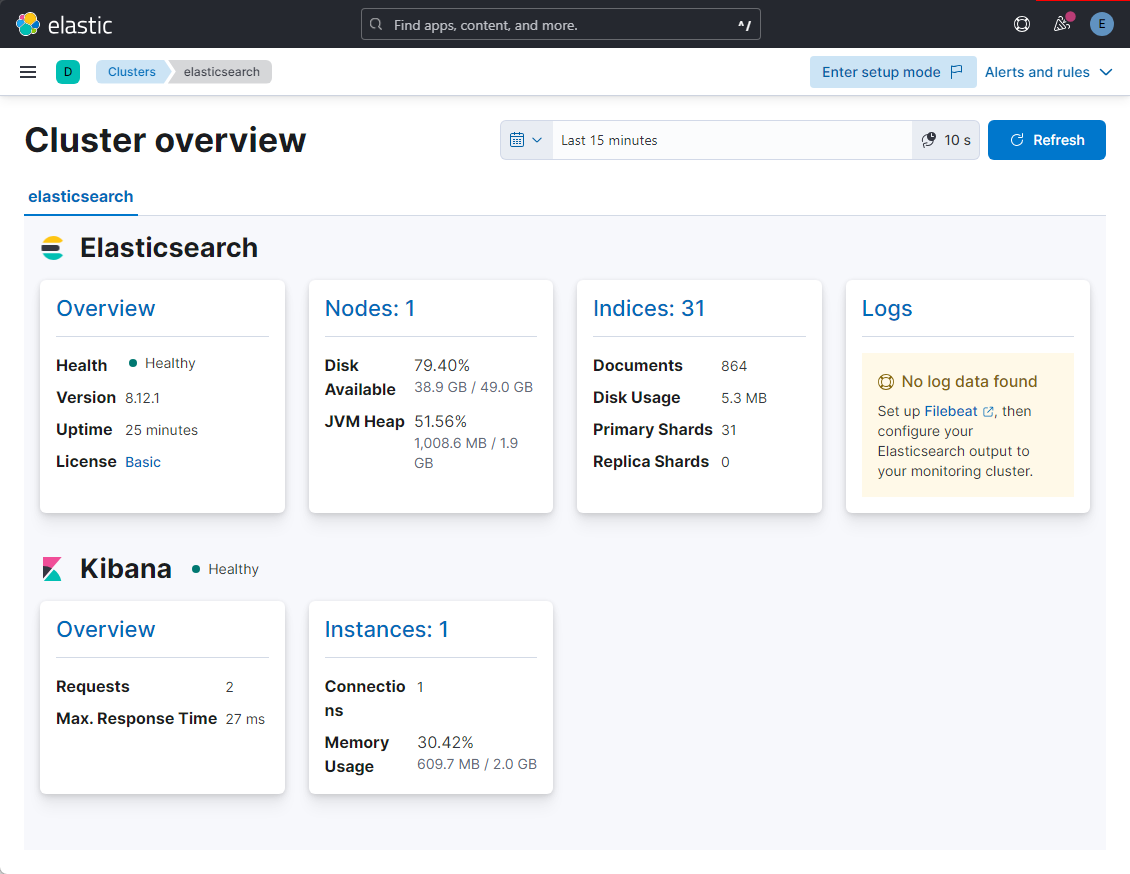
Kibana에서 클러스터 확인
- Stack Monitoring → Cluster 상태 확인
- Dev Tools → API 직접 실행
GET _cluster/health
GET _cat/nodes?v
참고URL
- elasticsearch guide : Install Elasticsearch with Debian Package
- kibana guide : Install Kibana with Debian package
728x90
'리눅스' 카테고리의 다른 글
| [WIP] Docker Compose로 EFK(Elasticsearch, Fluentd, Kibana) 스택을 구성하는 방법 (0) | 2026.03.21 |
|---|---|
| [WIP] Elasticsearch 클러스터의 상태를 점검하고 모니터링하는 방법 (0) | 2026.03.21 |
| [WIP] 우분투에서 Elasticsearch 8 설치 및 클러스터 구성 방법 (0) | 2026.03.20 |
| [WIP] Docker iptables 설정 오류 및 네트워크 통신 불가 문제 해결 (0) | 2026.03.18 |
| [WIP] 리눅스에서 auditd(감사)를 설치하고 사용하는 방법 (0) | 2026.03.17 |


