728x90
SSH 인증서를 이용한 인증을 구성하는 방법(Certificate Authority 기반)
테스트 환경
운영체제 정보
$ cat /etc/redhat-release
CentOS Linux release 8.4.2105
Certificate Authority (CA)
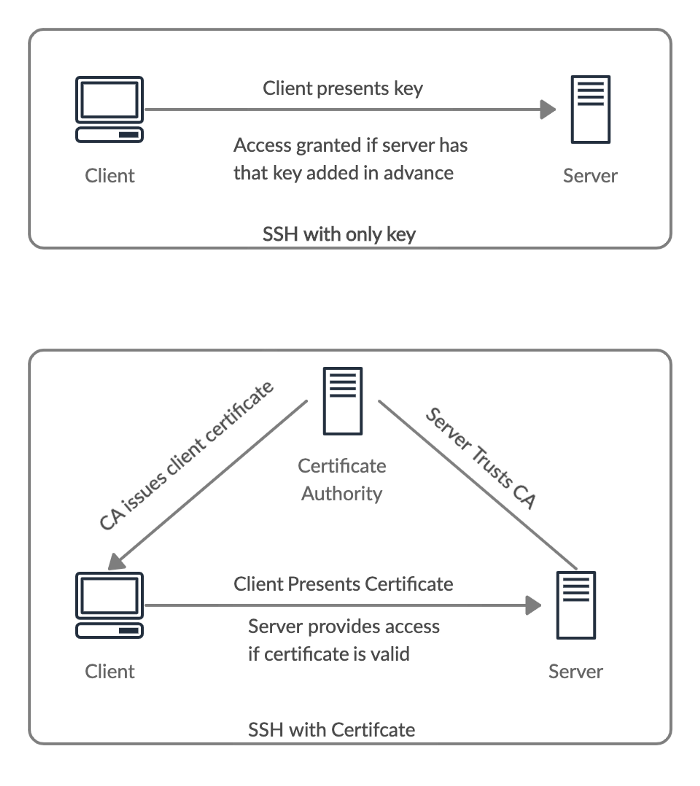
1. Docker 환경 구성
네트워크 생성
docker network create vnetwork컨테이너 실행
# CA 서버
docker run -d --privileged --cap-add=SYS_ADMIN \
--name auth-server -h auth-server \
--net vnetwork anti1346/centos8-sshd:latest /sbin/init

# SSH 서버
docker run -d --privileged --cap-add=SYS_ADMIN \
--name ssh-server -h ssh-server \
--net vnetwork anti1346/centos8-sshd:latest /sbin/init

# SSH 클라이언트
docker run -d --privileged --cap-add=SYS_ADMIN \
--name ssh-client -h ssh-client \
--net vnetwork anti1346/centos8-sshd:latest /sbin/init
기본 root 패스워드 : root
2. CA 서버에서 인증서 생성
auth-server 접속
docker exec -it auth-server bash서버용 CA(Certificate Authority) 생성
ssh-keygen -t rsa -b 4096 -f Server_CA -C "Server Certificate Authority"root@auth-server:~$ ls
Server_CA Server_CA.pub- Server_CA : Private Key
- Server_CA.pub : Public Key
3. SSH 서버 Host 인증서 구성
SSH 서버 공개키 전달
# ssh-server 접속
docker exec -it ssh-server bash

# host public key 확인
ls /etc/ssh/ssh_host_rsa_key.pub

# CA 서버로 전송
scp /etc/ssh/ssh_host_rsa_key.pub root@auth-server:~
CA에서 Host 인증서 서명
# auth-server
ssh-keygen -s Server_CA \
  -I host-ssh-server \
  -h \
  -n ssh-server \
  -V +52w \
ssh_host_rsa_key.pubssh_host_rsa_key-cert.pub인증서 SSH 서버로 배포
scp ssh_host_rsa_key-cert.pub root@ssh-server:/etc/ssh/sshd 설정
echo 'HostCertificate /etc/ssh/ssh_host_rsa_key-cert.pub' >> /etc/ssh/sshd_config
systemctl restart sshd
확인
grep HostCertificate /etc/ssh/sshd_config728x90
4. Client 인증을 위한 CA 구성
Client CA 생성
# auth-server
ssh-keygen -t rsa -b 4096 -f Client_CA -C "Client Certificate Authority"
SSH 서버에 CA 등록
scp Client_CA.pub root@ssh-server:/etc/ssh/# ssh-server
echo 'TrustedUserCAKeys /etc/ssh/Client_CA.pub' >> /etc/ssh/sshd_config
systemctl restart sshd확인
grep -E 'HostCertificate|TrustedUserCAKeys' /etc/ssh/sshd_config5. 클라이언트 인증서 발급
SSH 클라이언트 키 생성
# ssh-client
ssh-keygen -t rsa -b 4096 -C "root@ssh-client"
~/.ssh/id_rsa
~/.ssh/id_rsa.pub공개키 CA 서버로 전송
scp ~/.ssh/id_rsa.pub root@auth-server:~CA에서 사용자 인증서 발급
# auth-server
ssh-keygen -s Client_CA \
  -I user_identifier \
  -n root \
  -V +10m \
  id_rsa.pub
생성
id_rsa-cert.pub클라이언트로 인증서 배포
scp id_rsa-cert.pub root@ssh-client:/root/.ssh/6. SSH 접속 테스트
# ssh-client
ssh ssh-server
최초 접속 시
The authenticity of host 'ssh-server (172.19.0.3)' can't be established.
RSA key fingerprint is SHA256:Hhu32zRXVq8rZNS6tErHDRaU0ISBRf9K5u2l9InEtho.
Are you sure you want to continue connecting (yes/no/[fingerprint])? yes
Warning: Permanently added 'ssh-server,172.19.0.3' (RSA) to the list of known hosts.
성공
root@ssh-server:~$ hostname
ssh-server
7. 인증 만료 확인
인증서를 10분(+10m)으로 설정했기 때문에 10분 이후 접속 시
- 인증서 만료
- 패스워드 로그인으로 fallback
참고URL
-90. [SSH] CA를 통한 SSH 접속 방법 및 Vault로 클라이언트 SSH CA 키 관리하기 : https://blog.naver.com/alice_k106/221803861645
- access.redhat.com : 14.3.3. Creating SSH CA Certificate Signing Keys
- DigitalOcean Tutorial : How To Create an SSH CA to Validate Hosts and Clients with Ubuntu
- SSH CA host and user certificates : https://liw.fi/sshca/
- How to Use SSH Certificates for Scalable, Secure, and More Transparent Server Access
728x90
'리눅스' 카테고리의 다른 글
| [WIP] Sublist3r 설치하는 방법 (0) | 2026.03.30 |
|---|---|
| [WIP] 우분투에 qos mod를 설치하고 설정하는 방법(mod_qos) (0) | 2026.03.30 |
| [WIP] 웹 서버의 최대 동시 접속자 수 및 TPS를 측정하는 도구(tools) (0) | 2026.03.25 |
| [WIP] 쿠버네티스 리소스 삭제하는 방법 (0) | 2026.03.25 |
| [WIP] 고가용성 클러스터를 구성하여 VIP(Virtual IP)를 사용하는 방법 (0) | 2026.03.24 |


