728x90
GitLab Container Registry 사용하기
GitLab Container Registry는 GitLab 프로젝트에서 Docker 이미지를 저장하고 관리할 수 있는 내장 이미지 저장소입니다.
Docker Hub와 동일한 방식으로 push, pull이 가능하며 GitLab CI/CD Pipeline과 연계하여 빌드 및 배포 자동화 환경을 구성할 수 있습니다.
1. GitLab Container Registry 구조
GitLab Registry 이미지 주소는 다음과 같은 형식을 사용합니다.
registry.example.com/<namespace>/<project>/<image>:<tag>registry.binddns.com/playground/docker-images:latest구성 요소
- registry.binddns.com : GitLab Container Registry 주소
- playground : GitLab Namespace 또는 Group
- docker-images : Container Image 이름
- latest : Image Tag
2. GitLab Container Registry 로그인
Docker CLI를 이용하여 GitLab Registry에 인증합니다.
$ docker login registry.binddns.com
Username: binddns
Password:
WARNING! Your password will be stored unencrypted in /root/.docker/config.json.
Configure a credential helper to remove this warning. See
https://docs.docker.com/engine/reference/commandline/login/#credentials-store

Login Succeeded
Docker 인증 정보 확인
로그인 정보는 Docker 설정 파일에 저장됩니다.
$ cat ~/.docker/config.json기본 위치
/root/.docker/config.json비밀번호가 평문 형태로 저장되는 것을 방지하려면 Docker Credential Helper 사용을 권장합니다.
3. Docker 이미지 생성(Build)
Dockerfile이 위치한 경로에서 이미지를 생성합니다.
$ docker build -t registry.binddns.com/playground/docker-images .빌드 완료 후 이미지 확인
$ docker images
REPOSITORY                                     TAG       IMAGE ID       CREATED         SIZE
gitlab/gitlab-ce                               latest    7b8db4329c1c   25 hours ago    2.31GB
certbot/certbot                                latest    7dca0a9c8066   5 weeks ago     108MB
728x90
4. 기존 이미지 Registry Tag 생성
이미 존재하는 Docker 이미지를 GitLab Registry에 업로드하기 위해 Registry 주소 형식으로 Tag를 생성합니다.
Registry Tag 생성
$ docker tag certbot/certbot:latest registry.binddns.com/playground/docker-images:latest현재 이미지 확인
$ docker images
REPOSITORY                                     TAG       IMAGE ID       CREATED         SIZE
gitlab/gitlab-ce                               latest    7b8db4329c1c   25 hours ago    2.31GB
certbot/certbot                                latest    7dca0a9c8066   5 weeks ago     108MB
registry.binddns.com/playground/docker-images  latest    7dca0a9c8066   5 weeks ago     108MB
5. GitLab Container Registry Push
생성한 이미지를 GitLab Registry에 업로드합니다.
$ docker push registry.binddns.com/playground/docker-images
Using default tag: latest
The push refers to repository [registry.binddns.com/playground/docker-images]
263c92c8b7ad: Pushed
6ae4b14bebca: Pushed
4bb2249b073f: Pushed
a32f4fcc7545: Pushed
fa20ef29e396: Pushed
4558d4a1e7b7: Pushed
5adf6a2adcff: Pushed
b12aaecf5b11: Pushed
5d7294785f65: Pushed
3661f107c2a7: Pushed
52a9e72954d8: Pushed
b36a03007bb7: Pushed
32f366d666a5: Pushed
latest: digest: sha256:5418f32c7b23d8d370911282d5643962cb7895638a4d161d824ead31e43141f8 size: 3047
정상적으로 업로드가 완료되었습니다.
6. Registry 업로드 이미지 확인
GitLab 프로젝트 화면에서 확인합니다.
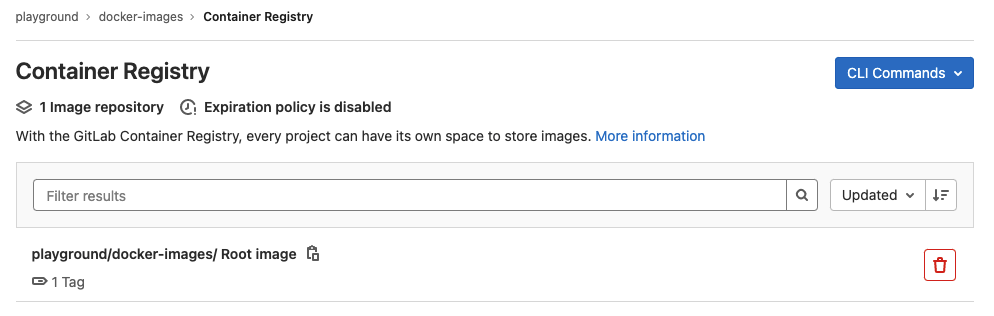
7. Registry 이미지 다운로드(Pull)
다른 서버에서 동일한 이미지를 사용할 경우
로그인
$ docker login registry.binddns.com이미지 다운로드
$ docker pull registry.binddns.com/playground/docker-images:latest확인
$ docker images
728x90
'리눅스' 카테고리의 다른 글
| [WIP] elasticsearch 클러스터 구성에서 인덱스 생성 (0) | 2026.06.10 |
|---|---|
| [WIP] Nginx를 위한 SSL 인증서를 생성하는 방법 (0) | 2026.06.10 |
| [WIP] PHP에서 MySQL 데이터베이스와 상호 작용하기 위한 주요 MySQL 커넥터 (0) | 2026.06.08 |
| [WIP] motd, issue, issue.net의 차이점 (0) | 2026.06.08 |
| [WIP] SquirrelMail 설치 및 Apache 연동 설정 (CentOS/RHEL) (0) | 2026.06.08 |


