728x90
PHP 8.1에서 MongoDB 확장 모듈을 업그레이드하는 방법
테스트 환경
운영체제 버전 정보
$ cat /etc/redhat-release
CentOS Linux release 7.9.2009 (Core)
PHP 버전 정보 확인
$ php --version
PHP 8.1.23 (cli) (built: Aug 30 2023 08:23:26) (NTS gcc x86_64)
Copyright (c) The PHP Group
Zend Engine v4.1.23, Copyright (c) Zend Technologies
    with Zend OPcache v8.1.23, Copyright (c), by Zend Technologies
MongoDB 확장 모듈 버전 정보 확인
php -i | egrep "MongoDB support|MongoDB extension"MongoDB support => enabled
MongoDB extension version => 1.13.0
MongoDB extension stability => stablePEAR 패키지의 버전 정보를 확인
pear list -a$ pear list -a
Installed packages, channel __uri:
==================================
(no packages installed)
Installed packages, channel doc.php.net:
========================================
(no packages installed)
Installed packages, channel pear.php.net:
=========================================
Package Version State
Archive_Tar 1.4.14 stable
Console_Getopt 1.4.3 stable
PEAR 1.10.13 stable
PEAR_Manpages 1.10.0 stable
Structures_Graph 1.1.1 stable
XML_Util 1.4.5 stable
Installed packages, channel pecl.opendogs.org:
==============================================
(no packages installed)
Installed packages, channel pecl.php.net:
=========================================
Package Version State
igbinary 3.2.14 stable
mcrypt 1.0.6 stable
mongodb 1.13.0 stable
rdkafka 6.0.1 stable
redis 5.3.7 stable
zip 1.22.2 stableMongoDB 확장 모듈 다운로드
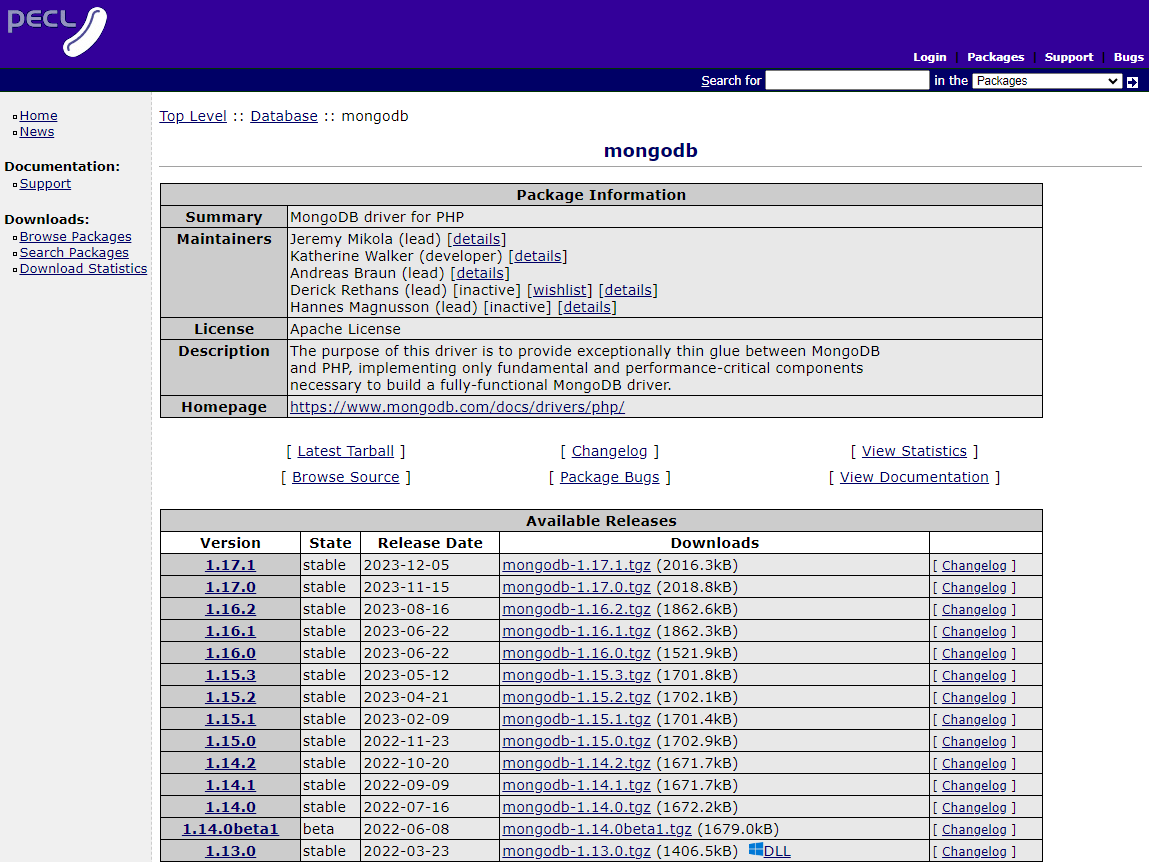
MongoDB 확장 모듈 업그레이드
/usr/local/src 디렉토리로 이동
cd /usr/local/srcMongoDB PECL 확장 모듈 다운로드
wget https://pecl.php.net/get/mongodb-1.16.2.tgz압축 해제
tar xfz mongodb-1.16.2.tgz다운로드 받은 디렉토리로 이동
cd mongodb-1.16.2PHP 확장 모듈을 빌드하기 위해 phpize 실행
/bin/phpize빌드 구성
./configure --with-php-config=/bin/php-config빌드하고 설치
make -j$(nproc) && make install -j$(nproc)$ make -j$(nproc) && make install -j$(nproc)
...
----------------------------------------------------------------------
Libraries have been installed in:
/usr/local/src/mongodb-1.16.2/modules
If you ever happen to want to link against installed libraries
in a given directory, LIBDIR, you must either use libtool, and
specify the full pathname of the library, or use the `-LLIBDIR'
flag during linking and do at least one of the following:
- add LIBDIR to the `LD_LIBRARY_PATH' environment variable
during execution
- add LIBDIR to the `LD_RUN_PATH' environment variable
during linking
- use the `-Wl,-rpath -Wl,LIBDIR' linker flag
- have your system administrator add LIBDIR to `/etc/ld.so.conf'
See any operating system documentation about shared libraries for
more information, such as the ld(1) and ld.so(8) manual pages.
----------------------------------------------------------------------
Build complete.
Don't forget to run 'make test'.
Installing shared extensions: /usr/lib64/php/modules/MongoDB 모듈 교체
MongoDB 모듈 백업(mongodb 1.13.0)
mv /usr/lib64/php/modules/mongodb.so /usr/lib64/php/modules/mongodb_1.13.0.soMongoDB 모듈 추가(mongodb 1.16.2)
cp /usr/local/src/mongodb-1.16.2/modules/mongodb.so /usr/lib64/php/modules/mongodb.sophp -i | egrep "MongoDB support|MongoDB extension"MongoDB 모듈 확인-1
$ php -i | egrep "MongoDB support|MongoDB extension"
MongoDB support => enabled
MongoDB extension version => 1.16.2
MongoDB extension stability => stable
MongoDB 모듈 확인-2
$ php -m | egrep -i MongoDB
mongodb
728x90
'리눅스' 카테고리의 다른 글
| [WIP] Let's Encrypt(certbot) SSL 인증서를 발급하는 방법 (0) | 2025.12.14 |
|---|---|
| [WIP] Let's Encrypt(certbot) SSL 인증서를 발급하는 방법 (0) | 2025.12.14 |
| [WIP] 스크립트로 크론 작업을 추가하는 방법 (0) | 2025.12.14 |
| [WIP] macOS에서 OpenJDK를 사용하여 JDK 17을 설치하는 방법 (0) | 2025.12.14 |
| [WIP] 맥(Mac)에서 AWS CLI를 최신 버전으로 설치하는 방법 (0) | 2025.12.14 |


