728x90
Zabbix에서 특정 프로세스 상태를 모니터링하는 방법
1. 템플릿 생성
설정 → 템플릿 → 템플릿 작성
- 템플릿 이름 : Template Instance Log Monitoring
- 그룹 : Template
- 이름 : Instance 로그 모니터링 템플릿
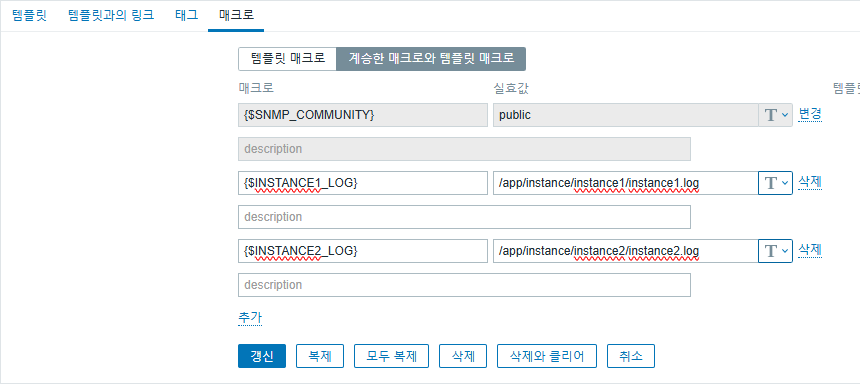
2. 매크로 생성
설정 → 템플릿 → Template Instance Log Monitoring 템플릿 → 매크로
- 매크로
- {$INSTANCE1_LOG}
- {$INSTANCE1_LOG}
- 값
- /app/instance/instance1/instance1.log
- /app/instance/instance2/instance2.log
3. 어플리케이션 생성
설정 → 템플릿 → Template Instance Log Monitoring 템플릿 → 어플리케이션 작성
- 이름 : Instance Logs Monitoring
4. 아이템 생성
설정 → 템플릿 → Template Instance Log Monitoring 템플릿 → 아이템 → 아이템 작성
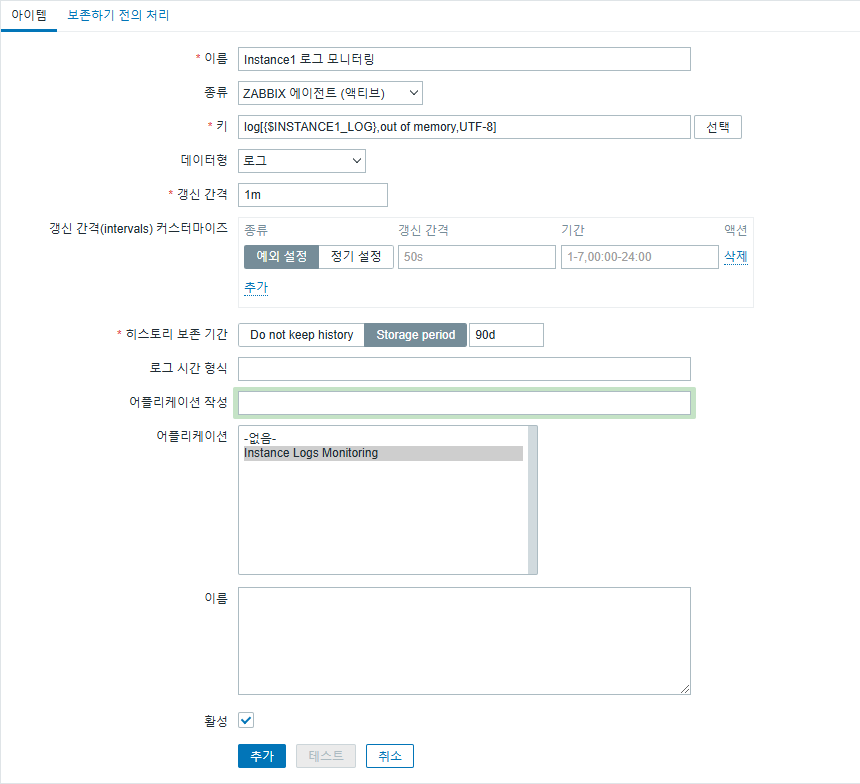
Instance1 로그 모니터링
- 이름 : Instance1 로그 모니터링
- 종류 : Zabbix agent (active)
- 키 : log[{$INSTANCE1_LOG},out of memory,UTF-8]
- 데이터형 : 로그
- 갱신 간격 : 60s
- 어플리케이션 : Instance Logs Monitoring
Instance2 로그 모니터링
- 이름 : Instance2 로그 모니터링
- 종류 : Zabbix agent (active)
- 키 : log[{$INSTANCE2_LOG},out of memory,UTF-8]
- 데이터형 : 로그
- 갱신 간격 : 60s
- 어플리케이션 : Instance Logs Monitoring
5. 트리거 생성
설정 → 템플릿 → Template Instance Log Monitoring 템플릿 → 트리거 → 트리거 작성
Instance1 로그 트리거
- 이름 : Instance1에서 "out of memory" 감지
- 심각도 : 중증 장애
- 조건식
{Template Instance Log Monitoring:log[{$INSTANCE1_LOG},out of memory,UTF-8].strlen()}>0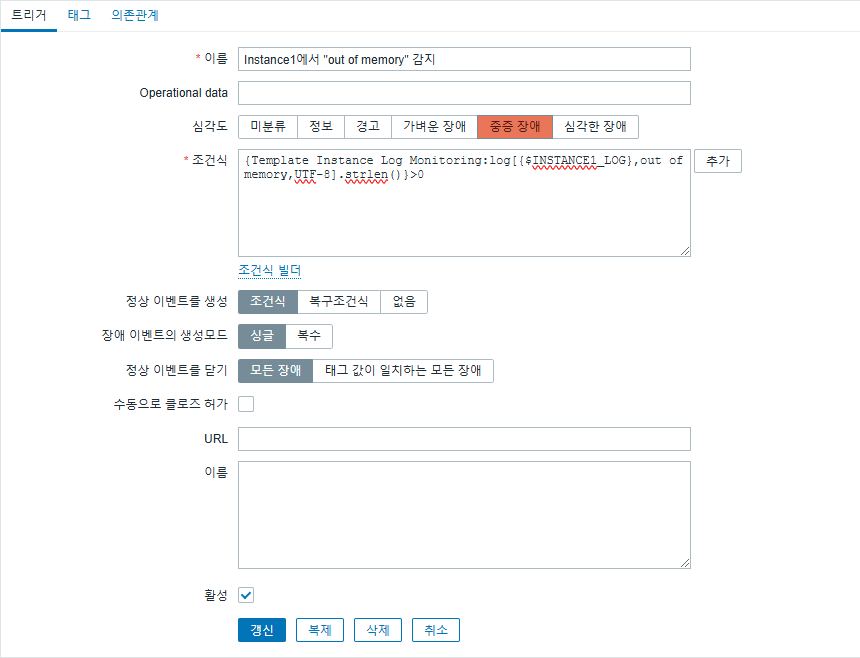
Instance2 로그 트리거
- 이름 : Instance2에서 "out of memory" 감지
- 심각도 : 중증 장애
- 조건식
{Template Instance Log Monitoring:log[{$INSTANCE2_LOG},out of memory,UTF-8].strlen()}>0
Zabbix가 로그 파일에서 "out of memory" 키워드를 실시간으로 감지할 수 있으며 트리거를 통해 알림을 받고 로그 데이터를 분석할 수 있습니다.
728x90
'리눅스' 카테고리의 다른 글
| [WIP] 우분투에서 로컬 파일 시스템을 백엔드로 사용하는 JuiceFS를 구성하는 방법 (0) | 2026.01.20 |
|---|---|
| [WIP] CentOS 7의 EOL 문제로 인해 발생하는 패키지 설치 오류를 해결하는 방법 (0) | 2026.01.20 |
| [WIP] CentOS 7에서 Go 언어를 설치하는 방법 (0) | 2026.01.19 |
| [WIP] 우분투 "sudo: cd: command not found" 오류 (0) | 2026.01.19 |
| [draft] 우분투 22.04에서 Ruby 2를 설치하는 방법 (0) | 2026.01.19 |


