728x90
Docker로 Swagger UI를 실행하여 REST API를 테스트하는 방법
Swagger UI를 Docker 컨테이너로 실행하면 별도의 설치나 환경 설정 없이 로컬 환경에서 REST API를 손쉽게 테스트할 수 있습니다.
1. Docker 설치
Docker를 시스템에 설치합니다. Docker 공식 웹사이트에서 각 운영체제에 맞는 설치 방법을 확인할 수 있습니다.
2. Swagger(OpenAPI) JSON 파일 준비
Swagger UI는 OpenAPI Specification(JSON 또는 YAML) 파일을 기반으로 API 문서를 시각화합니다.
이 파일에는 API의 엔드포인트, 매개변수, 응답 형식, 보안 설정 등이 기술되어 있습니다.
vim swagger.json{
"openapi": "3.0.0",
"info": {
"title": "Sample API",
"version": "1.0.0"
},
"paths": {
"/users": {
"get": {
"summary": "Get a list of users",
"responses": {
"200": {
"description": "Successful response",
"content": {
"application/json": {
"example": {
"users": [
{ "id": 1, "name": "Alice" },
{ "id": 2, "name": "Bob" }
]
}
}
}
}
}
}
}
}
}- openapi : 사용하는 OpenAPI Specification 버전 (예: 3.0.0)
- info : API의 기본 정보(제목, 버전 등)
- paths : API 엔드포인트 정의 영역
- /users: API 경로
- get: HTTP 메서드
- summary: API 설명
- responses: 응답 코드별 응답 구조 정의
이 외에도 인증 방식(security), 요청 파라미터(parameters), 데이터 모델(components/schemas) 등을 확장하여 정의할 수 있습니다.
728x90
3. Swagger UI Docker 컨테이너 실행
터미널을 열고 아래 명령어를 실행하여 Swagger UI Docker 이미지를 실행합니다.
docker run -p 8080:8080 \
	-e SWAGGER_JSON=/app/swagger.json \
    -v ./swagger.json:/app/swagger.json
    swaggerapi/swagger-ui
더보기
Unable to find image 'swaggerapi/swagger-ui:latest' locally
latest: Pulling from swaggerapi/swagger-ui
4060ece20d7a: Pull complete
7875cf511d73: Pull complete
f0fedff218af: Pull complete
7a5666f74111: Pull complete
0632371cce84: Pull complete
3d333a45c7c7: Pull complete
6de0e7ce1b7e: Pull complete
6d91d070ecef: Pull complete
8997c1960314: Pull complete
8a6209e00284: Pull complete
c1863f8ed1f2: Pull complete
39620f6807e2: Pull complete
10b33fd4e75c: Pull complete
b61140bad1ca: Pull complete
Digest: sha256:c5cbd527b8e197a12dbd51428b4499f1d3d1276b69da39c8b178ee31a3cc95e4
Status: Downloaded newer image for swaggerapi/swagger-ui:latest
/docker-entrypoint.sh: /docker-entrypoint.d/ is not empty, will attempt to perform configuration
/docker-entrypoint.sh: Looking for shell scripts in /docker-entrypoint.d/
/docker-entrypoint.sh: Launching /docker-entrypoint.d/10-listen-on-ipv6-by-default.sh
10-listen-on-ipv6-by-default.sh: info: Getting the checksum of /etc/nginx/conf.d/default.conf
10-listen-on-ipv6-by-default.sh: info: Enabled listen on IPv6 in /etc/nginx/conf.d/default.conf
/docker-entrypoint.sh: Sourcing /docker-entrypoint.d/15-local-resolvers.envsh
/docker-entrypoint.sh: Launching /docker-entrypoint.d/20-envsubst-on-templates.sh
20-envsubst-on-templates.sh: Running envsubst on /etc/nginx/templates/default.conf.template to /etc/nginx/conf.d/default.conf
/docker-entrypoint.sh: Launching /docker-entrypoint.d/30-tune-worker-processes.sh
/docker-entrypoint.sh: Launching /docker-entrypoint.d/40-swagger-ui.sh
/docker-entrypoint.sh: Configuration complete; ready for start up
2023/08/26 08:23:57 [notice] 1#1: using the "epoll" event method
2023/08/26 08:23:57 [notice] 1#1: nginx/1.25.1
2023/08/26 08:23:57 [notice] 1#1: built by gcc 12.2.1 20220924 (Alpine 12.2.1_git20220924-r4)
2023/08/26 08:23:57 [notice] 1#1: OS: Linux 5.15.49-linuxkit-pr
2023/08/26 08:23:57 [notice] 1#1: getrlimit(RLIMIT_NOFILE): 1048576:1048576
2023/08/26 08:23:57 [notice] 1#1: start worker processes
2023/08/26 08:23:57 [notice] 1#1: start worker process 62
2023/08/26 08:23:57 [notice] 1#1: start worker process 63
2023/08/26 08:23:57 [notice] 1#1: start worker process 64
2023/08/26 08:23:57 [notice] 1#1: start worker process 65
2023/08/26 08:23:57 [notice] 1#1: start worker process 66- -p 8080:8080: 호스트의 8080 포트와 컨테이너의 8080 포트를 매핑합니다.
- -e SWAGGER_JSON=/app/swagger.json: Swagger UI에 표시할 Swagger JSON 파일의 경로를 설정합니다. /app/swagger.json은 컨테이너 내부 경로입니다.
- -v ./swagger.json:/app/swagger.json: 호스트 머신에 있는 Swagger JSON 파일을 컨테이너 내부의 /app/swagger.json 경로로 마운트합니다.
4. Swagger UI 접속 및 API 테스트
웹 브라우저에서 http://localhost:8080을 열어 Swagger UI에 접속합니다. 여기서 API 문서를 시각적으로 볼 수 있으며, 테스트 요청을 보내고 응답을 확인할 수 있습니다.
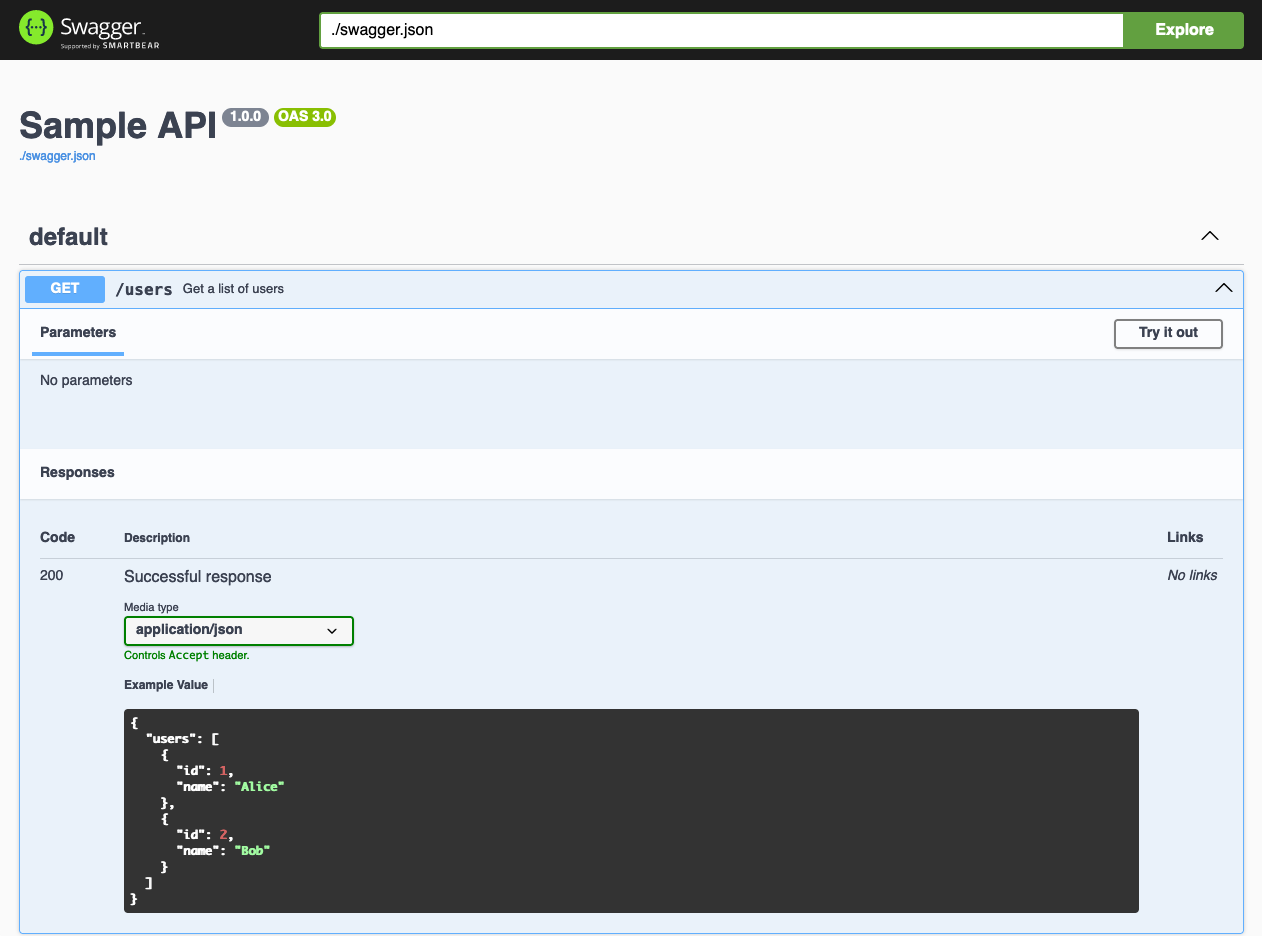
이제 이 방법으로 Swagger UI를 Docker 컨테이너로 실행하고 REST API를 테스트할 수 있습니다. 만약 다른 Swagger JSON 파일을 사용하고 싶다면 -e SWAGGER_JSON과 -v 옵션을 조정하여 사용하고자 하는 Swagger 파일을 지정하십시오.
728x90
'리눅스' 카테고리의 다른 글
| [WIP] Docker Bridge 네트워크 생성하는 방법 (0) | 2026.01.24 |
|---|---|
| [WIP] 우분투 22.04에서 MySQL 8을 바이너리 파일로 설치하는 방법 (0) | 2026.01.22 |
| [WIP] systemd의 로깅 설정을 변경하기 (0) | 2026.01.22 |
| [WIP] whois 명령어 (0) | 2026.01.21 |
| [WIP] CentOS 7에서 PHP-FPM 7.4를 설치하고 활성화하는 방법 (0) | 2026.01.21 |


