728x90
CentOS 7에서 MySQL 5.7을 소스 기반으로 설치하고 초기화하는 방법
CentOS 7.9 환경에서 MySQL 5.7.15를 소스 기반으로 설치하고 초기화하는 방법입니다.
테스트 환경
운영체제 정보
$ cat /etc/redhat-release
CentOS Linux release 7.9.2009 (Core)

$ getconf LONG_BIT
64- DB : MySQL Community Server 5.7.15
- 설치 경로 : /usr/local/mysql
1. MySQL 전용 계정 생성
보안 및 권한 관리를 위해 MySQL 전용 계정을 생성합니다.
groupadd -g 27 mysqluseradd -m -c "MySQL Server" -d /usr/local/mysql -s /bin/false -g 27 -u 27 mysql2. MySQL Community Server 다운로드
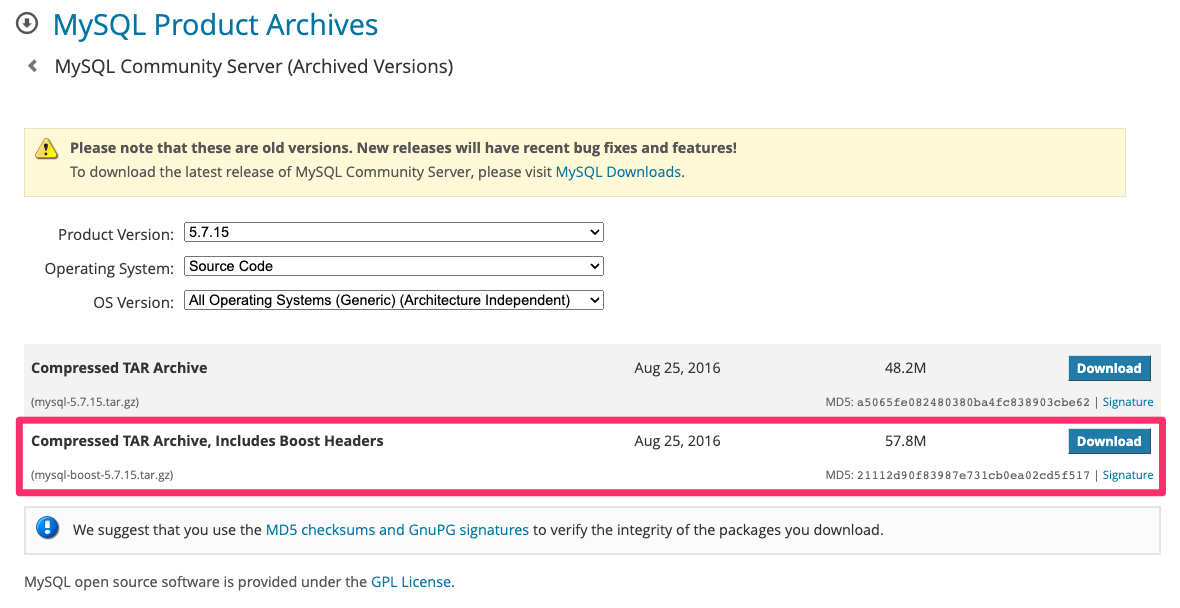
- 파일: mysql-boost-5.7.15.tar.gz
- Boost 라이브러리가 포함된 소스 패키지
tar xfz mysql-boost-5.7.15.tar.gz
cd mysql-5.7.15/
3. 컴파일 및 설치
cmake 설정
cmake \
-DCMAKE_INSTALL_PREFIX=/usr/local/mysql \
-DMYSQL_DATADIR=/usr/local/mysql/data \
-DSYSCONFDIR=/usr/local/mysql/etc \
-DMYSQL_UNIX_ADDR=/usr/local/mysql/tmp/mysql.sock \
-DMYSQL_TCP_PORT=3313 \
-DWITH_EXTRA_CHARSETS=all \
-DENABLED_LOCAL_INFILE=1 \
-DDEFAULT_CHARSET=utf8 \
-DDEFAULT_COLLATION=utf8_general_ci \
-DWITH_MYISAM_STORAGE_ENGINE=1 \
-DWITH_INNOBASE_STORAGE_ENGINE=1 \
-DWITH_PARTITION_STORAGE_ENGINE=1 \
-DWITH_ARCHIVE_STORAGE_ENGINE=1 \
-DWITH_BLACKHOLE_STORAGE_ENGINE=1 \
-DWITH_FEDERATED_STORAGE_ENGINE=1 \
-DWITH_BOOST=boost/boost_1_59_0 \
-DDOWNLOAD_BOOST=1
캐시 파일 삭제(필요 시)
rm -f CMakeCache.txt
컴파일 및 설치
make -j $(($(nproc) + 1))
make install -j $(($(nproc) + 1))
4. 필수 디렉토리 생성
mkdir -p /usr/local/mysql/{etc,logs,tmp,data}5. my.cnf 설정
my.cnf 기본 위치 확인
/usr/local/mysql/bin/mysqld --verbose --help | grep -A 1 'Default options'mysqld: Can't change dir to '/usr/local/mysql/data/' (Errcode: 2 - No such file or directory)
Default options are read from the following files in the given order:
/etc/my.cnf /etc/mysql/my.cnf /usr/local/mysql/etc/my.cnf ~/.my.cnf기본 설정 파일 복사
cp /usr/local/mysql/support-files/my-default.cnf /usr/local/mysql/etc/my.cnfmy.cnf 추가 설정
cat <<EOF >> /usr/local/mysql/etc/my.cnf

### ADD
basedir=/usr/local/mysql
datadir=/usr/local/mysql/data
port=3306
server_id=1
socket=/usr/local/mysql/tmp/mysql.sock

symbolic-links=0

[mysqld_safe]
log-error=/usr/local/mysql/logs/mysqld.log
pid-file=/usr/local/mysql/tmp/mysql.pid
EOF
6. 디렉토리 소유권 변경
chown -R mysql:mysql /usr/local/mysql7. MySQL 버전 확인
/usr/local/mysql/bin/mysqld -V/usr/local/mysql/bin/mysqld Ver 5.7.15 for Linux on x86_64 (Source distribution)8. DB 초기화
bin/mysqld --initialize --user=mysql --basedir=/usr/local/mysql --datadir=/usr/local/mysql/data --explicit_defaults_for_timestamp2022-03-03T14:47:17.751874Z 0 [Warning] 'NO_ZERO_DATE', 'NO_ZERO_IN_DATE' and 'ERROR_FOR_DIVISION_BY_ZERO' sql modes should be used with strict mode. They will be merged with strict mode in a future release.
2022-03-03T14:47:17.752123Z 0 [Warning] 'NO_AUTO_CREATE_USER' sql mode was not set.
2022-03-03T14:47:19.217844Z 0 [Warning] InnoDB: New log files created, LSN=45790
2022-03-03T14:47:19.498649Z 0 [Warning] InnoDB: Creating foreign key constraint system tables.
2022-03-03T14:47:19.618222Z 0 [Warning] No existing UUID has been found, so we assume that this is the first time that this server has been started. Generating a new UUID: d3baca13-9b00-11ec-a18e-68b599c59f7c.
2022-03-03T14:47:19.637821Z 0 [Warning] Gtid table is not ready to be used. Table 'mysql.gtid_executed' cannot be opened.
2022-03-03T14:47:19.638804Z 1 [Note] A temporary password is generated for root@localhost: w2lVwJfoy-q0초기화 과정에서 root 임시 비밀번호가 로그에 출력됩니다.
- A temporary password is generated for root@localhost: w2lVwJfoy-q0
9. SSL/RSA 인증서 생성
bin/mysql_ssl_rsa_setup --defaults-file=/usr/local/mysql/etc/my.cnfGenerating a 2048 bit RSA private key
............+++
....+++
writing new private key to 'ca-key.pem'
-----
Generating a 2048 bit RSA private key
..........................................................................................+++
........................................................+++
writing new private key to 'server-key.pem'
-----
Generating a 2048 bit RSA private key
..+++
...................................................................+++
writing new private key to 'client-key.pem'
-----10. MySQL 서버 시작
bin/mysqld_safe --defaults-file=/usr/local/mysql/etc/my.cnf --user=mysql &[1] 6547
2022-03-03T14:49:32.125650Z mysqld_safe Logging to '/usr/local/mysql/logs/mysqld.log'.
2022-03-03T14:49:32.237056Z mysqld_safe Starting mysqld daemon with databases from /usr/local/mysql/dataMySQL 프로세스 확인
ps -ef | grep -v grep | grep mysqlroot 6547 17984 0 23:49 pts/0 00:00:00 /bin/sh bin/mysqld_safe --user=mysql
mysql 6747 6547 0 23:49 pts/0 00:00:00 /usr/local/mysql/bin/mysqld --basedir=/usr/local/mysql_member --datadir=/usr/local/mysql_member/data --plugin-dir=/usr/local/mysql_member/lib/plugin --user=mysql --log-error=/usr/local/mysql/logs/mysqld.log --pid-file=/usr/local/mysql/tmp/mysql.pid --socket=/usr/local/mysql/tmp/mysql.sock --port=330611. MySQL 접속(root)
bin/mysql --socket=/usr/local/mysql/tmp/mysql.sock -uroot -p'w2lVwJfoy-q0'mysql: [Warning] Using a password on the command line interface can be insecure.
Welcome to the MySQL monitor. Commands end with ; or \g.
Your MySQL connection id is 2
Server version: 5.7.15
Copyright (c) 2000, 2016, Oracle and/or its affiliates. All rights reserved.
Oracle is a registered trademark of Oracle Corporation and/or its
affiliates. Other names may be trademarks of their respective
owners.
Type 'help;' or '\h' for help. Type '\c' to clear the current input statement.
mysql>- 커맨드라인에 비밀번호 직접 입력은 권장되지 않습니다.
root 비밀번호 변경
ALTER USER 'root'@'localhost' IDENTIFIED BY 'netpassword';Query OK, 0 rows affected (0.00 sec)12. MySQL 서버 종료
bin/mysqladmin -h127.0.0.1 -uroot -p shutdownEnter password:
MySQL 소스 컴파일 설치는 버전 제어와 커스터마이징이 필요한 환경에서 가장 유연한 설치 방식이다.
728x90
'리눅스' 카테고리의 다른 글
| [draft] ss 명령어 (0) | 2026.01.17 |
|---|---|
| [draft] 우분투 22.04에 MySQL 8.0을 바이너리로 설치하는 방법 (0) | 2026.01.17 |
| [WIP] hplog 명령어 (0) | 2026.01.17 |
| [WIP] 록키 리눅스 다운로드(Rocky Linux Download) (0) | 2026.01.17 |
| [draft] 우분투에서 기본 텍스트 편집기를 변경하는 방법 (0) | 2026.01.17 |


